
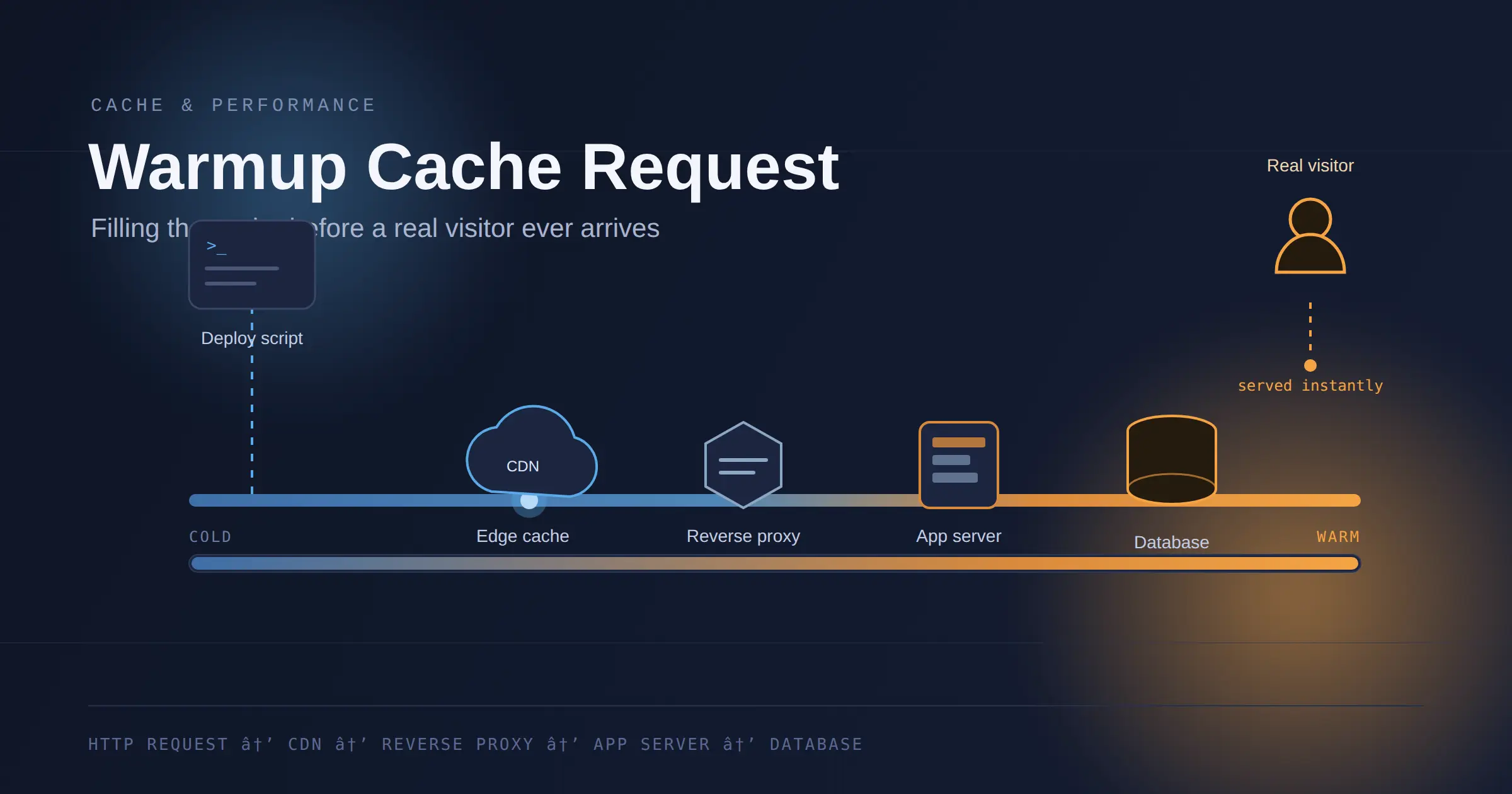
ou push new code, the cache gets purged, and for a few minutes your site is running on fumes. The next person who lands on it doesn’t get a fast, pre-loaded page — they get a cold origin fetch, a live database query, and whatever latency your backend feels like producing that day.
A warmup cache request is how you skip that part.
It’s a plain HTTP request — fired by a script, a deploy hook, or a scheduled job, never by a real visitor — with one job: fill the cache before anyone else shows up. It travels the same route a real user’s request would: CDN edge, reverse proxy, application server, database. By the time it’s done, the response is already sitting in cache, and the first real visitor gets served from there instead of from scratch.
That’s the entire idea. The rest of this guide covers how to do it properly — what to warm, how to build your URL lists, the mistakes that make warmup pointless or actively harmful, and how to check whether it’s actually working.
(You’ll also hear this called “cache preloading” — same technique, different name depending on the vendor.)
Who Actually Needs This
Cache warming solves a real problem, but not every site has that problem. Worth being honest about that before you spend an afternoon building a script.
It’ll earn its keep if:
- You deploy often enough that a cold cache is routine, not a rare event
- You sit behind a CDN or reverse proxy where the first request after a purge is noticeably slower than the hundredth
- Your traffic spikes around launches, campaigns, or press — moments where the first wave of visitors matters more than usual
- You’ve already dealt with the obvious performance problems and are now chasing the gap that’s left
Skip it, or keep it minimal, if:
- Your traffic is low and steady, and deploys are rare — organic visits will refill the cache within minutes anyway, and a script is one more thing to maintain for a problem you barely feel
- Your pages aren’t cached at all — fully dynamic, personalized per user — because there’s nothing for a warmup request to populate
- Your backend is genuinely slow and you haven’t fixed that yet — warming a cache in front of a slow origin just hides the cost for the one request that happens to land cold, without touching the actual problem
Not sure which camp you’re in? Pull up your CDN or reverse proxy’s cache hit ratio. Above 90% most of the day, warming only moves the needle in the narrow window right after a deploy. Dips hard after every release and stays low for more than a few minutes — that’s the gap this guide is for.
Why a Cold Cache Costs More Than It Looks Like
Cold cache isn’t “a bit slower.” It’s a specific, measurable failure:
- Time to First Byte spikes, because the origin has to run application logic, hit the database, and assemble a response from nothing.
- Largest Contentful Paint slips, because the browser is stuck waiting on that slow first byte before it can render anything.
- Backend load spikes at the worst possible moment — right after a launch or a press mention, exactly when traffic is highest. At scale, this is the same mechanism behind the thundering herd problem: a burst of simultaneous cache misses all hammering the origin at once.
- Two visitors, two different experiences, depending purely on whether they happened to land before or after the cache filled up on its own.
A cache with nothing in it can only produce misses, and misses cost time. Warmup requests remove that window before it opens.
How a Warmup Request Moves Through Your Stack
- The script sends a standard HTTP GET to a target URL — nothing a browser wouldn’t send.
- It hits your CDN edge node. No match for that cache key (or the TTL’s expired), so it forwards upstream.
- Your reverse proxy or load balancer routes it to an app server. Normal logic runs — templating, database calls, API calls — and a response gets built.
- The response comes back carrying caching headers (
Cache-Control,ETag, sometimesSurrogate-Control) that tell every layer above how long to keep it and under what conditions. - Each layer stores it per those headers — edge node, reverse proxy, maybe an application or database cache too.
- The next real request for that URL and cache key gets served straight from cache. No origin contact at all.
Step 6 is where people trip up. “Same URL and cache key” is carrying a lot of weight in that sentence. If your cache key factors in query parameters, cookies, or a Vary header, and your warmup request doesn’t match what real users send, you’ve warmed an entry nobody will ever hit. More on that in the debugging section.
What to Warm — and What to Leave Alone
You don’t need your entire site warmed. Trying to is how a warmup script turns into a self-inflicted denial-of-service attack on your own origin.
Worth warming, roughly by impact:
- CDN edge cache — full HTML pages, static assets, images
- Reverse proxy cache (Varnish, NGINX) — cached HTML or fragments between users and your app server
- In-memory application cache (Redis, Memcached) — query results and computed data that vanish on every restart
- Database query cache — for the expensive queries sitting behind your most-visited pages
Content to prioritize:
- Homepage and main navigation entry points
- Top-traffic category and listing pages
- Product, pricing, or offer pages tied to a campaign
- API endpoints your frontend calls on initial load
Content that should never touch a warmup list:
- Authenticated pages, dashboards, account settings
- Shopping carts or checkout state
- Any route that varies by cookie, session, or user identity
- Admin panels and staging environments
Warming personalized content isn’t just wasted effort — it can populate a shared cache with one user’s data and serve it back to a stranger. That’s not a performance bug. That’s a data leak. If a route depends on Vary: Cookie or anything similar, leave it off the list, no exceptions.
One more thing worth flagging: some plugins and platforms expose warmup as a public, unauthenticated URL. If yours does, anyone who finds it can trigger a warmup run on demand — a mild nuisance at best, a way to strain your own origin at worst. Kick off warmup from your deploy pipeline or an authenticated internal job, not from a route the open internet can hit.
What Cache Warming Won’t Fix
Worth being blunt here, since warmup gets oversold in a lot of write-ups:
- It won’t make a slow backend fast. An 800ms database query is still an 800ms database query. Warming means one unlucky request eats that cost instead of everyone — it doesn’t shrink the cost itself. Every miss after a TTL expiry still hits the same slow path.
- It won’t shrink payload size. A bloated image or unminified bundle is exactly as bloated served from cache as it was straight from the origin. Warming changes when the cost lands, not how much it is.
- It won’t help logged-in experiences. Dashboards and session-specific pages generally can’t live in a shared cache at all, so there’s nothing for warmup to touch.
- It adds a piece of infrastructure someone has to own. A script that goes stale or breaks silently when your URL structure changes isn’t “set and forget” — the checklist further down covers how to keep it current.
- It can hide a real problem if nobody’s watching the metrics. Suppress the visible symptoms of a slow origin and it gets easy to ignore the slowness until it resurfaces somewhere warmup doesn’t reach.
None of that argues against doing it. It argues for doing it alongside fixing what’s actually slow, not instead of.
Three Ways to Build a Warmup List
Match the method to your stage — you don’t need the most sophisticated setup on day one.
A static, manually maintained list. Write down your 20–50 most important URLs and hit them with a script after every deploy. This covers most small-to-mid-size sites fine. The failure mode: the list goes stale. New pages launch and never make it in; old ones get pulled from the site and linger in the script for months.
Sitemap-driven warmup. Parse your XML sitemap instead of hand-maintaining a list, warming everything in it (or filtering by priority values). New content shows up in the sitemap and gets picked up on the next run — nobody has to remember to touch the script.
Log-driven, traffic-ranked warmup. Pull your access logs or analytics export, rank URLs by traffic or conversion value, and warm the top slice — the top 100 or 500, say. Makes sense once you have enough log volume to rank pages meaningfully, and it adapts automatically as what’s popular shifts.
Most teams should move through these in order rather than jumping straight to the third one. A static list you actually keep up is worth more than a “data-driven” system nobody built yet.
Matching the Method to the Situation
| Your situation | Recommended method | Why |
|---|---|---|
| Small site, infrequent deploys, one person managing it | Static list | Fast to set up, easy to reason about, low risk of over-building something you’ll barely touch |
| Content site publishing regularly (blogs, publishers) | Sitemap-driven | New URLs get picked up automatically — a static list goes stale within weeks |
| Established site with real traffic data and a dedicated infra owner | Log-driven, traffic-ranked | Worth the build cost once your log volume is big enough to rank pages meaningfully |
| Anything mixing in authenticated or highly dynamic content | Static list, scoped narrowly | The more automated the list-building, the higher the odds it quietly includes a route it shouldn’t — automation needs guardrails here, not just speed |
A few concrete situations this maps to:
A publisher shipping several articles a day breaks a static list almost immediately — by the time someone remembers to add the new one, it’s already stopped being new. Sitemap-driven warmup fits: every published piece shows up in the sitemap, and the next run picks it up without a config change.
A store running a scheduled flash sale has the opposite shape — predictable, time-boxed traffic. A narrow, manually maintained list beats automation here: the sale page, the affected category pages, the checkout entry point (not checkout itself), fired right before the sale opens. You want direct control over what gets hit and when, not an algorithm guessing at it.
A SaaS product running an API behind Redis doesn’t have a “warmup list” of URLs at all. After a deploy restarts the app servers, Redis-backed query caches come back empty, so the fix lives in a startup routine that re-runs the most common queries and writes results into Redis before the app accepts real traffic. Static-list and sitemap thinking don’t map onto this case — the logic sits in application startup code, not an external script.
That last one’s a useful reminder: “warmup cache request” gets described almost entirely as an HTTP pattern, but the same idea — populate before serving — shows up inside application code too, not just at the CDN layer.
A Working Example: Warmup Script + Deploy Hook
A minimal, real script — not pseudocode — that warms a list of URLs with rate limiting. Drop it into a CI/CD pipeline right after a deploy or cache purge.
bash
#!/usr/bin/env bash
# warmup.sh — hits a list of URLs with a delay between requests
# Usage: ./warmup.sh urls.txt

URL_FILE="$1"
DELAY_SECONDS=0.5   # throttle: adjust based on your origin's capacity
USER_AGENT="WarmupBot/1.0 (+internal cache warming)"

if [ ! -f "$URL_FILE" ]; then
  echo "URL file not found: $URL_FILE"
  exit 1
fi

while IFS= read -r url; do
  [ -z "$url" ] && continue
  status=$(curl -s -o /dev/null -w "%{http_code}" \
    -A "$USER_AGENT" \
    -H "Cache-Control: no-cache" \
    "$url")
  echo "$status  $url"
  sleep "$DELAY_SECONDS"
done < "$URL_FILE"urls.txt:
https://example.com/
https://example.com/category/finance/
https://example.com/category/construction/
https://example.com/pricing/
That custom User-Agent isn’t decoration — it lets your firewall or bot rules recognize this traffic as intentional instead of something to challenge, and it gives you a clean way to filter warmup hits out of your analytics so they don’t inflate your pageview counts.
Wiring it into a deploy, a GitHub Actions step might look like:
yaml
- name: Warm cache after deploy
  run: |
    sleep 15   # give the CDN purge time to propagate first
    bash ./warmup.sh urls.txt
That 15-second delay matters more than it looks like it should. Warm before a purge finishes propagating across edge nodes, and you re-cache the old content with a fresh TTL — now you’re serving stale data on purpose. Purge, wait, then warm. In that order.
How to Tell If It’s Actually Working
Running the script isn’t the finish line. Confirm it did something.
| Metric | Where to check | Healthy sign |
|---|---|---|
| Cache hit ratio | CDN or reverse proxy logs, for warmed URLs specifically | Sharp rise within minutes of the run finishing |
| TTFB | Synthetic test on top URLs, before and after | Drops noticeably right after warmup |
| Origin request volume | Origin server logs for the warmed routes | Goes quiet — if it’s still busy, warmup isn’t landing in cache |
| Response status | Status codes from the warmup script itself | All 200s — a run full of errors is masking a bigger problem |
If none of these move after a run, something’s misconfigured. That’s not a hunch — see the next section for exactly what to check.
Mistakes to Catch Before You Write Any Code
The debugging section below covers technical symptoms. These are the planning-stage mistakes that cause them — worth checking against first.
Warming the wrong environment. A URL list gets copy-pasted from staging to production, or the reverse, and nobody updates the domain. The script runs fine and reports 200s — against the environment that didn’t need it, while the one that did stays cold.
Warming everything “to be safe.” Tempting, but it wastes origin capacity on pages nobody’s about to visit, and if unthrottled, it strains your own servers for no measurable payoff. Start narrow — homepage, top categories, top products — and expand only once traffic data justifies it.
Nobody owns the list. Written during one deploy cycle, never touched again. Six months later it’s warming pages that don’t exist and missing the ones that do. Assign ownership to whoever owns the deploy pipeline, and put “review the warmup list” on the same schedule as other routine infra maintenance.
Skipping the baseline. No cache-hit-ratio or TTFB numbers from before warmup means no way to prove afterward that it changed anything. Obvious in hindsight, skipped constantly in practice.
Assuming one run covers every region. A single-origin script only warms the edge nodes closest to wherever it ran. Cheaper to catch this at the planning stage than while debugging a slow region in production later.
When Warmup Doesn’t Work: What to Check First
This is the part most guides skip, and it’s usually where the real time gets lost.
Cache hit ratio stays flat after a run. Almost always a cache key mismatch. The script hit /products/shoes; real users load /products/shoes?color=black&size=10. If query strings are part of your cache key, those are two separate entries. Fix: build the warmup list from real request patterns pulled out of access logs, not the “clean” version of the URL.
TTFB is still high, but only in some regions. The run happened from one location and only warmed the edge nodes near it — CDNs keep independent caches per region. Fix: run warmup from multiple regions, or push cache population through your CDN’s API directly.
Users see stale content after a purge plus warmup. The warmup requests reached some edge nodes before the purge finished propagating everywhere, so the old version got re-cached with a fresh TTL. That’s a cache invalidation timing problem, and the fix belongs on the purge side, not the warmup side — add the delay (the 15-second sleep above is exactly this), or confirm the purge actually finished first.
Warmup itself is causing problems. No rate limiting. A script firing 500 requests as fast as it can is, functionally, a traffic spike you created on purpose. Fix: throttle to a rate your origin can absorb — start at 1–2 requests per second and raise it only if your origin metrics hold steady.
Authenticated pages “won’t warm.” Nothing’s broken — a shared cache can’t hold user-specific responses safely, so there’s nothing for warmup to populate. Leave these routes off the list entirely.
Cache Warming vs. Prefetching
Easy to blur these two, and mixing them up means solving the wrong problem.
Cache warming is system-level and proactive. You decide what loads and when, triggered by something on your side — a deploy, a purge, a scheduled job. The goal is infrastructure that’s ready before any user shows up.
Prefetching is user-level and behavioral. A visitor loads page A, the system guesses they’ll go to page B next, and starts loading B’s resources in the background — triggered by that one person’s behavior, in that one session.
Neither replaces the other. Warming handles infrastructure at scale; prefetching handles smoothness inside a single visit. Fast sites usually run both, because they’re solving different problems.
Cache Warming and Google’s Crawl Budget
Googlebot doesn’t wait for your cache to warm up before it crawls. Hit it during a cold-cache window — the minutes after a deploy or purge — and it gets the same slow TTFB a real visitor would. Response time is one of the factors in how thoroughly Google crawls a site over a given period, and a site that responds fast consistently tends to get crawled more thoroughly than one that doesn’t — regardless of whether the slowness comes from a genuinely overloaded server or just an empty cache.
Practical takeaway: if your deploy or purge process triggers a fresh crawl — a sitemap ping, for instance — make sure warmup runs before that trigger fires, not after.
Cache Warmup Checklist
- List your 20–50 highest-value URLs — homepage, top categories, top products or pricing pages, critical API endpoints.
- Write a script that hits that list with a
curlrequest each, throttled to a rate your origin can handle. - Set a custom
User-Agentso the traffic is identifiable and filterable out of analytics. - Wire it into your deploy pipeline, with a short delay after any cache purge.
- Check cache hit ratio and TTFB on your top URLs right after a run — confirm the numbers actually moved.
- Exclude anything authenticated, personalized, or session-dependent. No exceptions.
- Revisit the URL list monthly. Traffic patterns shift; the list should shift with them.
The Bottom Line
A warmup cache request doesn’t fix a slow query, an unoptimized image, or bloated JavaScript. What it fixes is narrower and more specific: the gap between “my cache is empty” and “my cache has caught up,” which otherwise gets paid for by whoever happens to show up first.
It’s also not something every site needs on day one. Low, steady traffic, or a bottleneck that’s actually somewhere else — fix that first and come back to warmup once it’s the real constraint. When it does fit, the job stays narrow: get the URL list right, throttle the requests, keep personal data off the list, and confirm the result shows up in your hit-ratio and TTFB numbers — not just in the fact that the script exited without errors.
FAQs
What is a warmup cache request?
An automated HTTP request — sent by a script, deploy hook, or scheduled job rather than a real visitor — that pre-populates your CDN, reverse proxy, or in-memory cache before real traffic arrives. It travels the same path a real request would, so the response lands in cache exactly as if a user had asked for it first.
Is cache warming the same as cache preloading?
Yes. Different vendors use different names for the same pattern. “Cache warming,” “cache preloading,” and “warmup cache request” all describe filling a cache proactively rather than letting it fill naturally through visits.
Does cache warming help SEO?
Indirectly, but measurably. Faster TTFB supports better Core Web Vitals, and a server that responds fast consistently tends to get crawled more thoroughly. Warming doesn’t move rankings by itself — it just removes a source of avoidable slowness that would otherwise count against you.
How often should warmup jobs run?
After deploys, after cache purges, and after any restart of an in-memory cache like Redis. For high-traffic pages with short TTLs, a scheduled run timed just before expiration keeps the cache from ever fully going cold. Running it on a fixed interval regardless of events is rarely worth it.
Can warmup requests overload my origin server?
Yes, if they’re not throttled. An unthrottled script hitting hundreds of URLs at once is, mechanically, a traffic spike you created yourself. Rate-limit every warmup process — start slow and raise the ceiling only based on what your origin metrics show it can take.
Is manual or automated warmup better?
Automated wins past a handful of pages, simply because manual warmup depends on someone remembering to run it. Wire it into CI/CD so it fires on every deploy without anyone thinking about it.
Will warmup traffic mess up my analytics?
It can, if you don’t filter it out. Warmup requests look like page views unless excluded. Use a distinct User-Agent or a query parameter, then filter that pattern out in your analytics tool.
Is there a downside to setting this up if I don’t strictly need it?
Mostly maintenance, not risk: a URL list that goes stale, a script that needs updating when routes change, one more moving part in the deploy pipeline that can quietly break. For a low-traffic site with infrequent deploys, that upkeep can cost more attention than the problem it solves. Worth building once cold-cache windows are a recurring, measurable issue — not by default on every project.